Saturday, October 24, 2026
Watch Live
UPDATED
FUEL PRICE
24-OCT-2026
PETROL
▼ -1.60 PKR
Rs. 377.71/ltr
DIESEL
▲ +1.91 PKR
Rs. 393.66/ltr
Headlines
Ishaq Dar joins R4 talks in Istanbul as regional tensions put diplomacy in focus AI pop star’s fake pregnancy announcement sends social media into a frenzy Britain and France conduct first joint nuclear exercise, ‘Rummy,’ over Mediterranean Ameer Gilani reveals newborn son’s name in emotional video Pakistan’s President Asif Ali Zardari receives guard of honor during Germany visit France reports first human case of Shamonda virus Ryan Gosling’s spooky rock band teases epic comeback after 17-year hiatus Pakistan security forces kill 10 militants in Gwadar operations, ISPR says Audi Q9 debuts world-first curved OLED taillights 12 killed, more than 20 injured in van-coach collision in Othal, Lasbela district Exporters pin hopes on prime minister's intervention as cost pressures mount FIA busts illegal kidney transplant ring in Islamabad Pakistan's army chief vows to 'hit hard' Indian-sponsored militants Prime Minister Shehbaz Sharif issues instructions to launch direct Pakistan-Maldives flights Ishaq Dar joins R4 talks in Istanbul as regional tensions put diplomacy in focus AI pop star’s fake pregnancy announcement sends social media into a frenzy Britain and France conduct first joint nuclear exercise, ‘Rummy,’ over Mediterranean Ameer Gilani reveals newborn son’s name in emotional video Pakistan’s President Asif Ali Zardari receives guard of honor during Germany visit France reports first human case of Shamonda virus Ryan Gosling’s spooky rock band teases epic comeback after 17-year hiatus Pakistan security forces kill 10 militants in Gwadar operations, ISPR says Audi Q9 debuts world-first curved OLED taillights 12 killed, more than 20 injured in van-coach collision in Othal, Lasbela district Exporters pin hopes on prime minister's intervention as cost pressures mount FIA busts illegal kidney transplant ring in Islamabad Pakistan's army chief vows to 'hit hard' Indian-sponsored militants Prime Minister Shehbaz Sharif issues instructions to launch direct Pakistan-Maldives flights

How to Activate Stolen Device Protection on iPhone

How to Activate Stolen Device Protection on iPhone

  • In the latest iOS 17.3 update, Apple introduced Stolen Device Protection.
  • To enable stolen device protection on your iPhone, understand the process involved.
  • The feature also safeguards financial information, including payment methods and items in Wallet.

In the latest iOS 17.3 update, Apple introduced an innovative security feature known as Stolen Device Protection.

Let's understand the process of enabling stolen device protection on your iPhone.

How Stolen Device Protection Works:

Typically, if someone steals your iPhone and is aware of the passcode, they can eliminate your Apple ID or reset the device.

Stolen device protection alters this scenario. It ensures that for significant tasks such as accessing stored passwords, disabling Lost Mode, resetting the phone, or configuring a new device, Face ID or Touch ID must be utilized.

This function also safeguards your financial information, including payment methods stored in Safari, applying for an Apple Card, and specific items in Wallet, such as Apple Cash or savings transfers.

Stolen Device Protection prevents a thief from making changes with just a passcode. They are required to verify their identity using Face ID or Touch ID, making it challenging for them to sell the phone for monetary gain.

Even if they disassemble it for individual parts, they still cannot deceive someone into purchasing a stolen phone.

When Stolen Device Protection is activated, there is a one-hour waiting period before certain changes can be made. Apple refers to this as a security delay.

It is applicable to actions such as altering your Apple ID password, logging out of your Apple account, or adding or removing a trusted device.

Throughout the security delay, you are unable to add or remove Face ID or Touch ID, modify your iPhone passcode, or reset all settings. Turning off Find My or Stolen Device Protection is also not possible during this period.

These regulations do not apply when you are in a trusted location, such as your home or office.

Your iPhone becomes familiar with these locations when you enable Significant Locations in Privacy and Security > Location Services > System Services. If you disable or delete this history, your phone will forget those recognized places.

For example, if you use your iPhone outside a recognized location, you will need Face ID or Touch ID. If you are away for an hour, re-authentication is required.

Note: Stolen Device Protection is compatible with iOS 17.3 and newer and is supported on iPhone XS and later models.

How to turn on stolen device protection:

  1. Go to Settings.

  2. Tap on Face ID and Passcode.

  3. Enter your phone's passcode.

  4. Turn on Stolen Device Protection.

[caption id="attachment_1008550" align="alignnone" width="640"]How to Activate Stolen Device Protection on iPhone How to Activate Stolen Device Protection on iPhone[/caption]

What to Do When You Lose Your iPhone:

If your iPhone is misplaced, promptly go to Find My and designate it as lost through a web browser. This action suspends most features and enables you to track the phone on a map.

Share this information with the police to aid them in locating your iPhone. It operates similarly to AirTags, utilizing nearby Apple devices to assist in the tracking process.
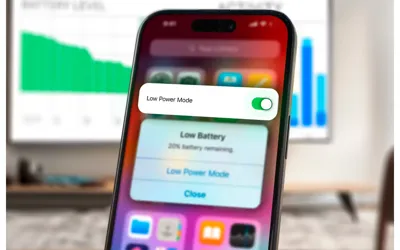
You can also utilize Lost Mode to display a message on your iPhone's screen. For instance, you can provide information indicating that it's your phone and you have misplaced it.

[embedpost slug="/samsung-galaxy-s24-top-rated-heavy-duty-cases-2024/"]

Provide your phone number to facilitate easy contact and the potential return of the device by someone who may find it.

If you receive threatening messages from a thief, claiming they will leak your data unless you remove the device from your account, do not be deceived. This is a common trick. Simply ignore such messages.

Recommended